Importing and Exporting External Signals To and From an Integrated IO FlexRIO Device

Updated Jan 29, 2026

Reported In

Hardware

  • PXIe-7915
  • PXIe-7911
  • PXIe-7912
  • PXIe-5763
  • PXIe-5764
  • PXIe-5775
  • PXIe-5785
  • PXIe-5745

Software

  • LabVIEW
  • LabVIEW FPGA Module

Driver

  • FlexRIO

Issue Details

I am using an Integrated I/O FlexRIO device and I know I can use the Configure Digital Edge Start Trigger VI to import a Start Trigger, but I want to import an external trigger I can access in LVFPGA, or export a signal from the FPGA to use it elsewhere, other than a start trigger. Since I am using an Integrated I/O device, it does not provide access to the PXI Trigger Lines as FPGA I/O Channels and I do not have a timing card to use the DStar Lines.

Solution

You can use the FlexRIO Route Signal VI to create routes between the 32 source and 32 destination logical routing resources in the Integrated I/O FlexRIO device's FPGA and the PXI triggers, the SMB trigger in the controller (controller dependent) and the chassis PFIs when using a PXIe chassis with the timing and synchronization option like a PXIe-1095 or PXIe-1092.

Use PXI_Trig0 to PXI_Trig7 to connect the PXI Trigger Lines, /PXIChassis1/PFI0 to /PXIChassis1/PFI3 to connect to the chassis' PFIs, or /<controller's name>/TRIG_SMB to connect to the controller's SMB trigger connector.

Additional Information

In the example below, the FlexRIO Route Signal VI is added to the host VI to import an external trigger coming from the chassis' PFI0 into Destination0.
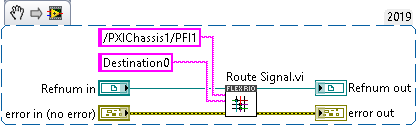


Figure 1. FlexRIO Route Signal (import).


Then, the signal can be received in the FPGA using an FPGA IO Node pointing to Routing\Destination0.
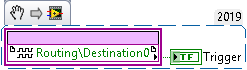


Figure 2. FlexRIO FPGA VI (Destination).


Likewise, Routing\Source0 can be routed to the PXI triggers, controller SMB trigger or chassis PFI to export a signal from the FPGA.
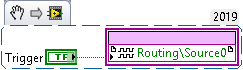


Figure 3. FlexRIO FPGA VI (Source).
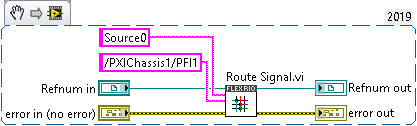

Figure 4. FlexRIO Route Signal (import).


If your FlexRIO device returns an error when trying to connect directly to the controller's SMB or chassis' PFI trigger lines, refer to the related links for workarounds to achieve the same task.

When you want to use a PXI Trigger instead of PFI1, you need to specify "PXI_Trig0" (for PXI Trigger 0) rather than "/PXIChassis1/PFI1" as the input. In addition, the PXI Trigger lines must be properly routed according to the procedure described in the Knowledge Base.