Can a Python Node Call a Function That Includes Python Packages?

Updated Mar 23, 2026

Reported In

Software

  • LabVIEW 2019

Issue Details

  • I have a Python function, which uses NumPy and other Python packages as part of the calculations. Can the Python Node call this kind of function?
  • Is it possible to execute a Python function in LabVIEW if the function has a dependency on some library/package?

Solution

Yes, the Python Node can call a function that uses a package, such as [External] NumPy. To do so, you must import the required packages in the same Python script where you define your function.


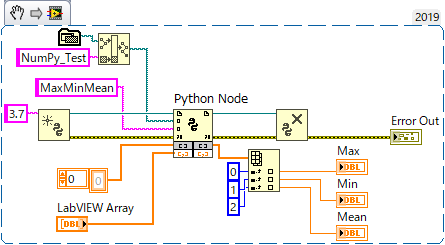
Below is an example script that imports the NumPy package. A function called MaxMinMean uses this to calculate the maximum, minimum and mean value of a given array. 

# First, import NumPy.
import numpy as np

def MaxMinMean(lvarray):
    """
    This function returns the maximu, minimum and mean
    values of the "lvarray" in a list. 
    """
    
    # Convert LabVIEW array into NumPy array.
    nparray = np.array(lvarray)
    
    # Calculate the max, min and mean values.
    arrmax = np.max(nparray)
    arrmin = np.min(nparray)
    arrmean = np.mean(nparray) 
    
    return [arrmax, arrmin, arrmean]


The code snippet below demonstrates how to call the MaxMinMean function from LabVIEW.

Note: This image is a LabVIEW snippet, which includes LabVIEW code that you can reuse in your project. To use a snippet, right-click the image, save it to your computer, and drag the file onto your LabVIEW diagram.

Additional Information

This article does not guarantee all functions in the NumPy package are supported by the LabVIEW Python Node.

LabVIEW 2019 added support to convert LabVIEW arrays to NumPy arrays and vise versa.