This content is not available in your preferred language.

The content is shown in another available language. Your browser may include features that can help translate the text.

How to Check Whether a DAQ Device is Simulated in LabVIEW?

Updated Nov 17, 2022

Environment

Software

  • LabVIEW

Driver

  • NI-DAQmx

I have several real and simulated DAQ devices in NI Measurement & Automation Explorer (MAX). How can I programmatically determine whether the device is real or simulated in LabVIEW? 

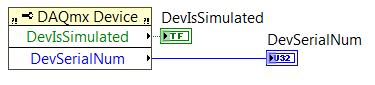
There are two ways to determine whether a DAQ device is real or simulated using the NI-DAQmx Device Property node.
  1. Device Is Simulated property - This property returns a boolean "True" if the device is simulated.
  2. Identification >> Device Serial Number property - This property returns an interger "0" if the device is simulated.
To get DAQmx Device property node, in LabVIEW Block Diagram, go to Functions >> Measurement I/O >> NI DAQmx >> Advanced >> System Setup >> Device Node.