Introduction
Ensuring the client machine can ping the volume licensing server helps verify a working network connection between them. There are two main ways to address the licensing server while performing a ping test: by machine name/alias or by IP address. When pinging the licensing server by machine name or alias, the network relies on a domain name system (DNS) to match the name that was entered to that system's IP address. Ping tests can be performed using the Windows command line outlined below.
Running the Ping Test
For the ping test, perform a ping using both the machine name and the IP address.
- Obtain the IP address and machine name of the Licensing Server. The IP address can be obtained using the ipconfig command and the machine name can be obtained using the hostname command from a Windows command prompt.
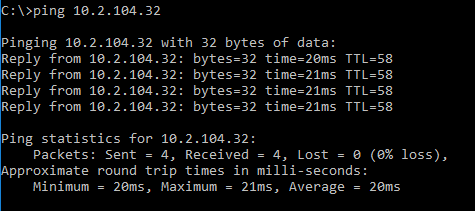
- Open a Windows command prompt from the client computer and use the ping command to send a test ping to the server using its IP address.
successful:
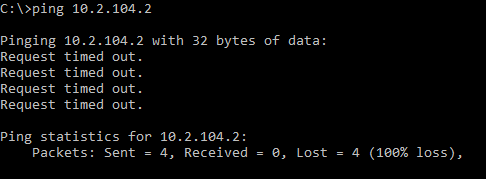
unsuccessful:
- If the ping test was successful using the IP address, now repeat the test using the machine name instead.
What the Results Mean
Unable to Ping Licensing Server Using Its IP Address
This means that there is no network route from one machine to the other. For help placing your machines on the same network, contact your network administrator.
IP Address Responds, but the Machine Name or Alias Does Not
This is most likely a DNS issue. This will need to be resolved by either ensuring the DNS server can map the machine name to its IP address (if using a local DNS server) or avoided by addressing the licensing server using only its IP address. For help resolving DNS issues, contact your network administrator.
If Both Tests Are Successful
This confirms that the licensing server is addressable from the client machine and the network can route to the licensing server when using the machine name. Next, move on to checking to see if the correct ports are open .