This content is not available in your preferred language.

The content is shown in another available language. Your browser may include features that can help translate the text.

Error -307719 While Deploying NI VeriStand Project With PXI XNET Module

Updated Aug 26, 2026

Reported In

Hardware

  • PXI-8512
  • PXI-8513
  • PXIe-8510

Software

  • VeriStand

Driver

  • NI-XNET

Issue Details

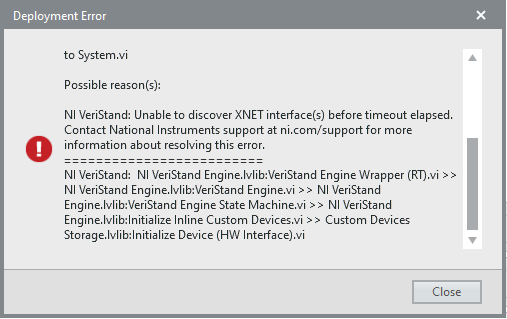
I am not able to deploy my VeriStand Project with PXI XNET Modules, the following error occurs:

Deployment Error
Project Window.lvlib:Project Window.vi >> Project Window.lvlib:Command Loop.vi >> Project Window.lvlib:Connect to System.vi
<append>=========================
NI VeriStand: NI VeriStand Engine.lvlib:VeriStand Engine Wrapper (RT).vi >> NI VeriStand Engine.lvlib:VeriStand Engine.vi >> NI VeriStand Engine.lvlib:VeriStand Engine State Machine.vi >> NI VeriStand Engine.lvlib:Initialize Inline Custom Devices.vi >> Custom Devices Storage.lvlib:Initialize Device (HW Interface).vi
<append>=========================
NI VeriStand: Error occurred at the following location:

"Targets/Controller/Hardware/Chassis/NI-XNET"
Error -307719 occurred at Project Window.lvlib:Project Window.vi >> Project Window.lvlib:Command Loop.vi >> Project Window.lvlib:Connect to System.vi

Possible reason(s):

NI VeriStand: Unable to discover XNET interface(s) before timeout elapsed. Contact National Instruments support at ni.com/support for more information about resolving this error. 


How do I fix this behavior?

Solution

The error shows up when VeriStand Engine fails to discover the XNET interfaces on your system.
Follow the instructions below to troubleshoot the issue:

  • Make sure that you have CAN devices in the RT target.
  • If the development system is deactivated or expired, VeriStand will not be capable of deploying the project to the target. Confirm that VeriStand is activated in License Manager.
  • Ensure that the PXI RT target has compatible NI-XNET Drivers installed. To verify compatibility, please refer to the NI-XNET Release Notes according to the version installed on your system.
  • Verify that the NI-XNET Card is being detected properly under Remote Systems in NI MAX, if the port appears as "Unknown" make sure you connect a transceiver to the port, after this it should be recognized as ports 1 to 4 show in the example image below:

  • Make sure that the name of XNET Interface port in the System Definition file of NI VeriStand is same as it appears in NI MAX. 
  • Consider disabling the CAN ports that are not in use in the VeriStand System Explorer.
  • Try reinstalling the VeriStand Engine.