Error -17600 in TestStand Using the LabVIEW Run-Time Engine

Updated Dec 25, 2025

Reported In

Software

  • TestStand
  • LabVIEW
  • LabVIEW Runtime

Issue Details

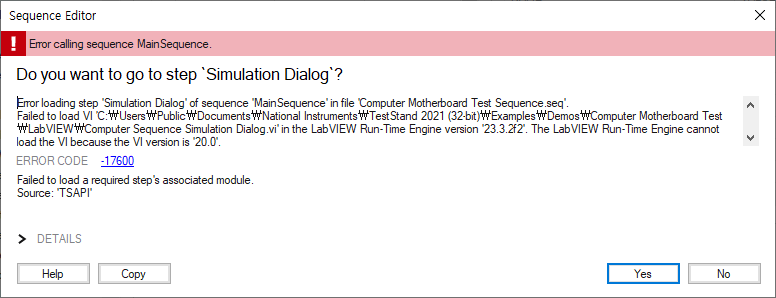
I get error code -17600:
LabVIEW: The VI is not executable. This error may occur because the VI is either broken or contains a subVI that LabVIEW cannot locate. Select File>>Open to open VI and verify that you can run it.

or:

Failed to load a required step's associated module.
Source: 'TSAPI'

Error -17600 in TestStand Using the LabVIEW Run-Time Engine.png

When I:

  • Run my deployed TestStand sequence on a deployment machine,
  • Run my TestStand application using the LabVIEW Run-Time Engine,
  • Run my TestStand sequence that uses multiple versions of the LabVIEW Run-Time Engine and auto detects the correct version to use,
  • Run my TestStand code that uses a custom User Interface ,
  • Run a TestStand example with latest version of TestStand and LabVIEW.

Solution

Error -17600 occurs when TestStand attempts to load a LabVIEW step which is either compiled in a different version than the adapter allows, or the LabVIEW Code Module attempts to load a dependency which is not accessible.


  • Mass Recompile your LabVIEW code/project to ensure they are all compiled using the same version of LabVIEW.
  • Make sure you have followed the instructions from the Deploying LabVIEW Code Modules with NI TestStand  tutorial.
  • Collecting all of your source code in one place using either a LabVIEW Source Distribution or Packed Project Library (PPL) ensures that all version and dependency conditions are included in the Source Distribution/PPL.
    • Build a Packed Project Library and keep in mind Caveats and Recommendations for Packed Project Libraries.
    • If the "broken" VI references a VI in a symbolic path such as <vi.lib>, the Run-Time Engine will not be able to resolve this symbolic path like the development environment can. Ensure that you uncheck the box "Exclude files from vi.lib/instr.lib/user.lib" to package these files with your distribution so that the Run-Time engine can find them. 
    • Enable the Output VIs to a Packed Project Library option within the TestStand Deployment Utility. This topic on Additional Packed Project Library Settings provides additional information.
  • Ensure that none of the subVIs are set to separate compiled code from source file.
  • Ensure that the path to the LabVIEW Project is specified for all of the LabVIEW code modules. Just specifying the VI path is not enough if using multiple LabVIEW Run-Time Engines. This is explained more in the 'Using a LabVIEW User Interface to call sequences with LabVIEW code modules; section of How TestStand Interacts with LabVIEW Application Instances.