Solution
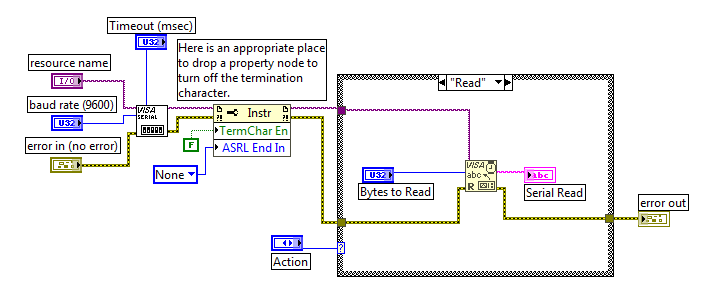
To do this, create a Property Node for the VISA resource name and set the
Termination Character Enable property to
False and the
Serial End Mode for Reads property to
None. Complete the following steps to accomplish this:
- Place a Property Node onto your block diagram.
- Connect your VISA resource name to the Reference input on the Property Node.
- Right-click the Property portion of the Property Node and choose Change All to Write from the shortcut menu. Also, use your positioning tool to expand the Property Node to have two properties instead of one.
- Using the Operating tool, click the first Property and select Message Based Settings » Termination Character Enable. Right-click on this property, choose Create » Constant and use your Operating tool to select False as the input value.
- Using the Operating tool, click the second property and change it to Serial Settings » Serial End Mode for Reads. Right-click on this property, choose Create » Constant and use your Operating tool to select None as the input value.
Make sure that you insert this Property Node after you call the VISA Configure Serial Port vi, otherwise the property will be set back to
True.
See the code below for an example of how to implement this.