Yes, the Vision Development Module is required to allow VBAI to generate LabVIEW Code. To migrate your VBAI Inspection to LabVIEW code:
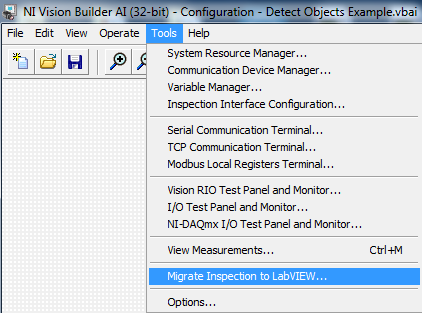
- From your VBAI Configuration Interface, go to Tools»Migrate Inspection to LabVIEW.
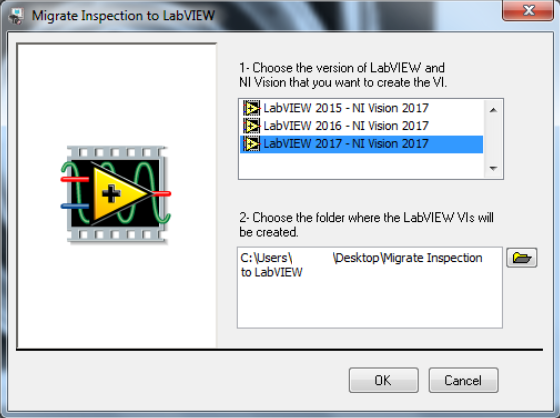
- A dialog box will appear which will allow you to choose the version of LabVIEW and NI Vision you will create the VI as well as the folder where the LabVIEW VIs will be created. Click OK to start the migration processs and will proceed to creating the LabVIEW VIs.
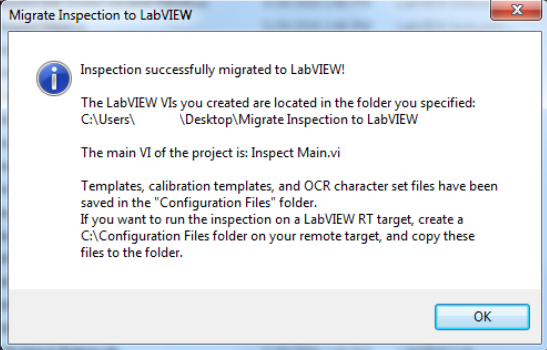
- Once finished migrating, A Dialog box will appear informing you that the VBAI Inspection was successfully migrated to LabVIEW.
 Note:
Note: Make sure that the bit versions between the VBAI and LabVIEW match. Otherwise, migration is not possible. For example, if you want to migrate to LabVIEW 2018 64-bit, you need the VBAI 64-bit.
Additional Information
VBAI uses the VIs that are provided by the NI-Vision Development Module to carry out the necessary Vision processing functions in the LabVIEW environment. The NI-Vision Development Module is a separate product from VBAI.