Error: VI Has Changed on Disk Since Last Saved or Loaded by LabVIEW

Updated Feb 13, 2026

Reported In

Software

  • LabVIEW

Issue Details

When I open my VI or a subVI, I get the following error:
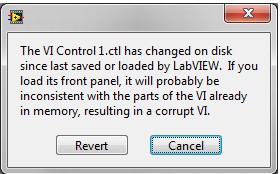
The VI has changed on disk since last saved or loaded by LabVIEW. 
If you load its front panel, it will probably be inconsistent with the parts of the VI already in memory, resulting in a corrupt VI. 

Solution

This error is most often caused by a third party application, such as automatic backup software or antivirus, opening a VI and making minor changes to its metadata, such as the timestamp.

To avoid this error, click the Revert button in the dialog to revert to the last version of the VI. Then make sure that the VI save location is omitted from any automatic software backups or updates.


Note: Clicking Cancel is the error dialog will cancel the VI load operation.

Additional Information

This error is more likely to occur when a VI is saved on a network location and can be accessed by network security or management software. 

Always maintain a version control system on all LabVIEW code including making backup copies of important VIs in order to prevent loss int he case of corruption.