Most DAQmx digital I/O boards are made to use with 5 V TTL logic levels. However, some hardware have the capability for a user to change the logic levels to user-defined values such as the NI 6535/36/37 family.
In order to do this in LabVIEW you can use a DAQmx Channel property node and use the property
Digital Input » Logic Family or
Digital Output » Logic Family as shown in Figure 1.
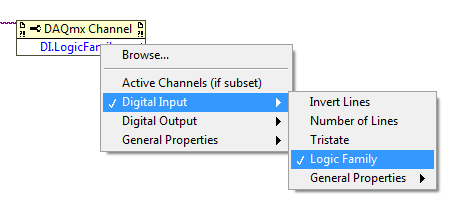
Figure 1: DAQmx Channel Property Node DI.LogicFamily
Not all DAQmx devices allow users to change the logic levels of the digital channels. The property will not be visible if a device which supports this functionality is not present in your system.
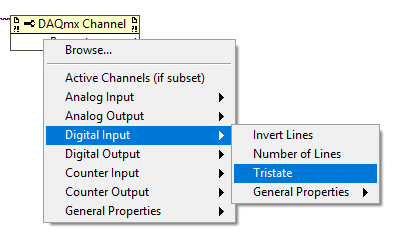
Figure 2: Logic Family property does not appear if supported device is not present in system
In LabWindows/CVI use the DAQmxSetChanAttribute() function. Use the Select Attribute Constant window to specify the device and select Logic Family from the list as shown in Figure 3.
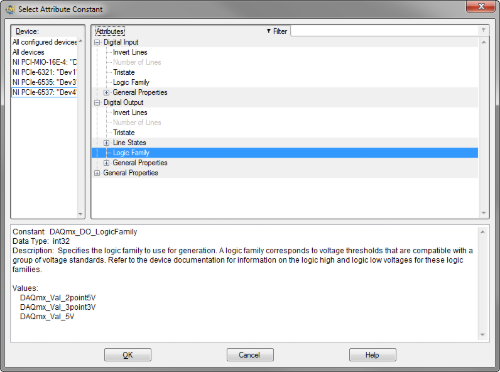
Figure 3: Logic Family Attribute Window in LabWindows/CVI
Use the Select Attribute Value window to select from the constant values representing the available logic families for the device as shown in Figure 4.
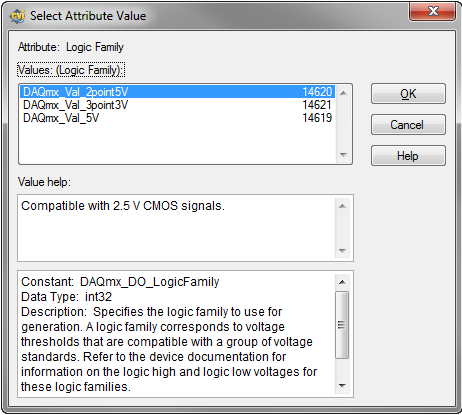
Figure 4: Logic Family Attribute Value Window in LabWindows/CVI
In .NET use the LogicFamily property of your DOChannel to configure the logic family as demonstrated below.
DOChannel myChannel = digitalWriteTask.DOChannels.CreateChannel(device,"",
ChannelLineGrouping.OneChannelForAllLines);
myChannel.LogicFamily = DOLogicFamily.FiveVolts;
If a device which supports a user-configurable Logic Family selection is present in the system, the property will be visible. However, if a DAQmx Channel which includes a device that does not support this feature is wired to this property, error -200452 will occur.
Refer to the device documentation to ensure that your device supports this functionality.
Note: This property applies the same configuration to all the channels and ports in the digital module. If you try to set a different digital logic level to each channel, you will get Error -200106.